100 days leftJanuary 2027: Snapchat archives Memories beyond 5 GB. What's changing
Mac app · for your Snapchat memories

Keep your Snapchat memories.
On the right date.

In January 2027, Snapchat locks away Memories beyond 5 GB. The free way to keep everything is to export them… but they arrive with no date or location. Rembobino gives every photo and video back its real date, its real time and its place on the map, right in Photos.

Try it for free: 100 memories free, no email or card needed.

Only for Macs with Apple silicon (M1 or later, not Intel Macs) · 37 MB · See how it works

  • 100 memories free
  • 100% on your Mac
  • €9.99 once, no subscription

Illustration: sample dates and places.

Why now

Snapchat is locking your memories away.

Since September 2025, Memories are only free up to 5 GB. Snapchat gave everyone a year to get organised. In January 2027, whatever goes over moves behind a subscription.

  1. '25 9 26

    The announcement

    Snapchat caps free Memories storage at 5 GB and launches paid plans.

  2. Today

    100 days to go

    All your memories are still accessible, and exporting your data is free.

  3. '27 1 1

    The archive

    Outside your oldest 5 GB, memories older than a year get archived: you still see the thumbnails, but you have to pay to open them.

Are you affected?

In Snapchat, open Settings › My App › Memories and look at Cloud Storage. Above 5 GB, part of your memories will be archived. A few years of videos is often enough.

Source: Snapchat Support, “How do I manage my Memories storage?”. Snapchat promises an in-app notice before anything changes.

Two ways to keep them

Stay with Snapchat
A subscription, every month, for as long as you want access.
Keep them yourself
Exporting is free, and Rembobino files everything in Photos on the right date. €9.99 once, and the trial is free.
The problem

Snapchat gives you back your memories. Not their story.

You download your data, open Photos… and nothing is where it belongs. It's not you: it's the way the archive is built.

Every date is wrong

The files carry the date you downloaded them. Your summer of 2019 ends up right next to this morning's photo.

Taken 2019-07-14 → filed under 2026-09-16

No locations left

The GPS coordinates sit in a separate file, never inside the photo. The Photos map stays empty.

memories_history.json → Latitude, Longitude: 43.4832, -1.5586

Stickers and captions split off

Everything you added on top (captions, drawings, stickers) comes in a separate file you'd have to merge back yourself.

2019-07-14_3E37…-main.jpg + 2019-07-14_3E37…-overlay.png

An archive in pieces

Several .zip files, folders with cryptic names, sometimes duplicates across files. Hard to tell whether anything is missing.

mydata~1789123456789.zip · memories.zip · memories-2.zip
How it works

Three steps, no tech skills needed.

Rembobino does the cross-checking for you: it matches each file to its Snapchat record, works out the local time where it was taken and writes everything back into the photo.

1

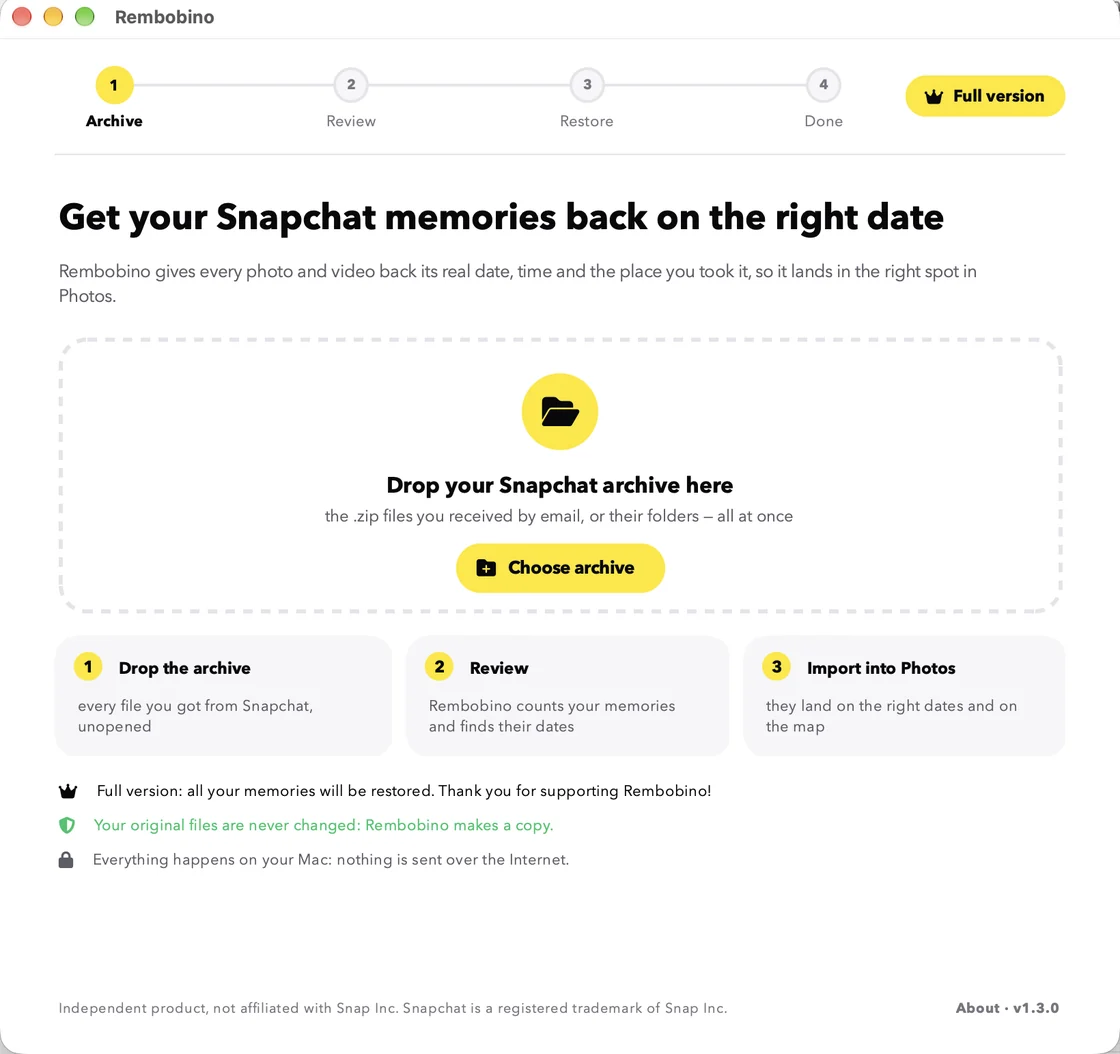
Drop in the archive, as is

Drag the .zip files you got from Snapchat into the window. No need to open, unzip or sort them.

Rembobino home screen: a “Drop your Snapchat archive here” area and the three steps.
2

Check that everything is there

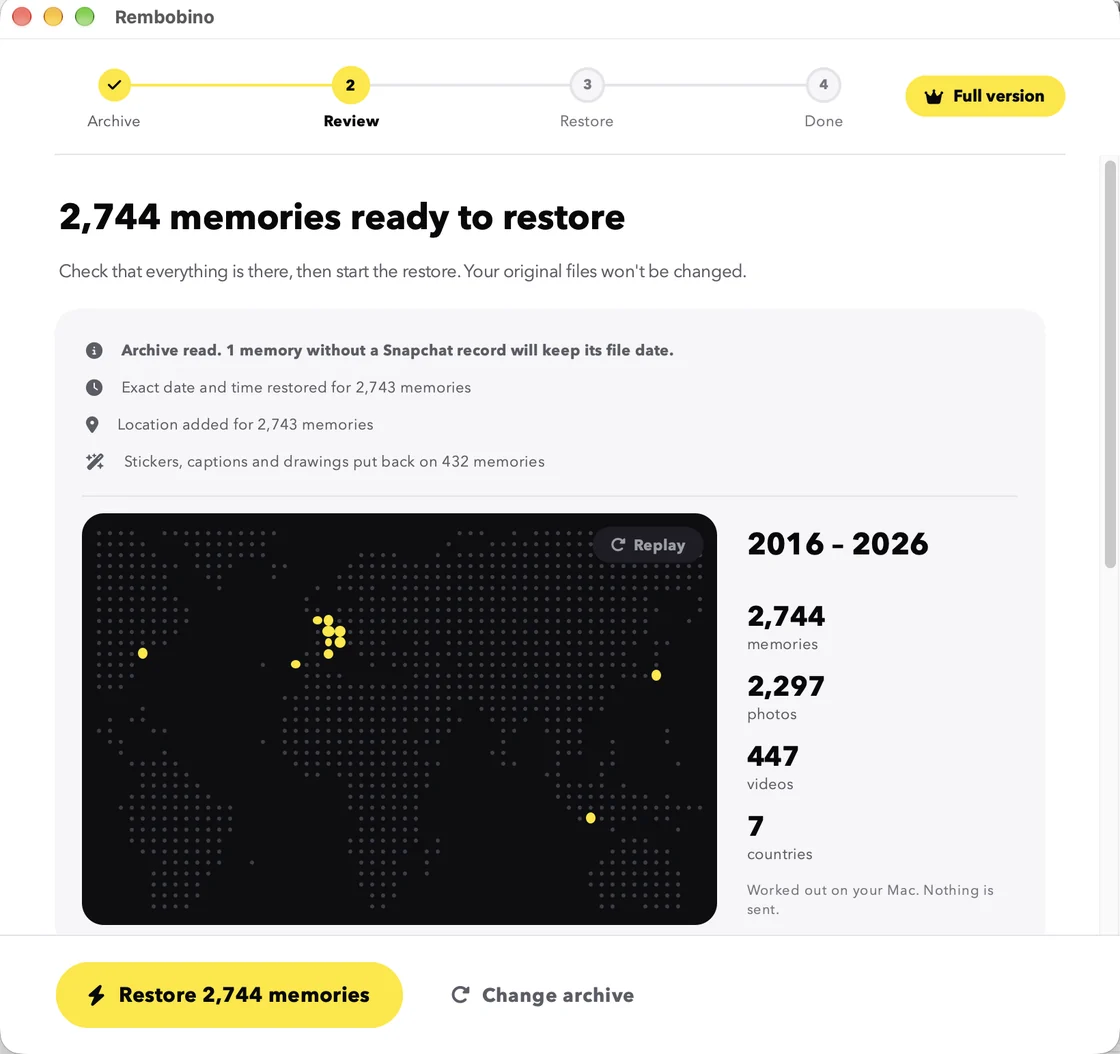
In a few seconds, Rembobino counts your photos and videos and brings them back onto a map, in the order you took them. It also warns you if part of the archive is missing.

  • Your years replayed on a map, worked out on your Mac
  • Incomplete archive flagged before you start
  • Disk space checked, duplicates skipped
Review screen: a world map where 2,744 memories from 2016 to 2026 appear, 2,297 photos, 447 videos, 7 countries, with dates, places and stickers restored.
Real app screenshot, with a sample archive.
3

Find them in Photos

Rembobino creates a clean copy of every memory, then walks you through importing it into Photos. With iCloud Photos, everything shows up on your iPhone too.

  • Keep using your Mac while it restores
  • Stop whenever you like and pick up later
  • To finish, your memories passport: first snap, trips, records
Final screen: the memories passport, with the map, 2,744 memories, the very first memory on June 4, 2016 and the farthest one 12,290 km away.
Real app screenshot, with a sample archive.
The difference

What you'd do by hand, in a few minutes.

For 1,284 memoriesImported as isFixed by handWith Rembobino
Date and time takenDownload dayOne by one, in PhotosAutomatic, to the second
Local time where it was taken (a vacation memory abroad keeps the right time)NoRarelyYes, from the GPS
Location on the mapNoneTyped in for each photoAutomatic
Stickers, captions and drawingsSeparate filesNot without editing softwareMerged back
Incomplete archive or duplicatesUnnoticedUnnoticedFlagged before you start
Time spent≈ 21 h
at 1 min per memory
A few minutes
Your memories stay yours

Nothing leaves your Mac. Ever.

100% offline

No account to create, nothing uploaded, no analytics. All the processing happens on your computer.

Your originals untouched

Rembobino reads your archive without changing it and works on a copy. If something isn't right, nothing is lost.

No password

You download your archive yourself from Snapchat's official website. Rembobino never connects to your account.

Pricing

Years of memories back in order, for the price of a movie ticket.

You pay once, no subscription. The app is yours to keep, for as many archives as you want to restore.

≈ 21 hof fixing by hand
for 1,284 memories
Based on one minute per memory to fix the date and location in Photos.
€9.99incl. VAT
One-time payment
  • Dates, times and places restored for all your photos and videos
  • Stickers, captions and drawings merged back
  • .zip archives read directly, duplicates skipped
  • Step-by-step import guide for Photos and iPhone
  • Unlimited archives, updates included
Buy the licence€9.99
or
Download the free trial

100 memories free, no email or card needed. You unlock the rest from the app.

14-day money-back guarantee. If Rembobino doesn't work with your archive, write to us and we'll refund you.

Mac with Apple silicon (M1 or later) · macOS 11 or later
Secure checkout by Paddle · instant licence key

Questions

Before you start

Another question? Write to us, we reply in English or French.

Is Snapchat going to delete my memories?

Not delete them, but lock them away. Free storage is capped at 5 GB. From January 2027, memories older than a year that aren't part of your oldest 5 GB will be archived: you'll see the thumbnails, but you'll need a subscription to open, share or download them. If you're under 5 GB, nothing changes. Either way, exporting your memories is free and gives you a copy of your own. Snapchat's official policy

How can I try Rembobino?

Click “Download for free”: the download starts immediately, no email or card needed, and a page shows you how to open the app the first time. The trial restores 100 memories, picked across all your years, so you can see the result in Photos before paying.

How do I unlock all my memories?

Buy the licence (€9.99, paid once), on this website or from the app. Your key appears right after payment: paste it into Rembobino and carry on. The 100 trial memories aren't redone. The key also works on your other Macs.

How do I get my Snapchat archive?

On Snapchat's website, go to the “My Data” page: turn on “Export your Memories”, pick the full date range, then submit. Snapchat emails you your .zip files, often within a few hours (up to 7 days for large archives). The full step-by-step guide

Will it work on my Mac?

Rembobino runs on Macs with Apple silicon (M1, M2, M3, M4 and later) with macOS 11 or later. It doesn't run on Intel Macs. To check: Apple menu › About This Mac, “Chip” line.

What about Windows, Android or Google Photos?

Not yet: Rembobino is a Mac app for now, built for Photos and the iPhone. If you restore your memories on a Mac, iCloud Photos then syncs them to your iPhone.

Will my memories show up on my iPhone?

Yes, if iCloud Photos is turned on: once imported into Photos on your Mac, they reach your iPhone, on their real dates and visible on the map.

I already saved some snaps to my camera roll. Will I get duplicates?

Photos detects duplicates during import: choose “Don't Import” and tick “Apply to all duplicates”. Only the memories you're missing get added.

What if part of my archive is missing?

Rembobino compares what Snapchat lists with what you dropped in, and warns you before starting. You can add the missing files at any time.

Is it safe? Could Snapchat hold it against me?

Rembobino never touches your account: it only reads the official archive you downloaded yourself, and everything happens on your Mac. Rembobino is an independent product, not affiliated with Snap Inc.

What if it doesn't work for me?

You have 14 days to ask for a refund, no complicated justification needed. Write to us: we're also happy to look into your case and help.
Your summer of 2019 is waiting somewhere in 2026.

Get your memories back before January 2027 and put each one where it belongs in a few minutes, without uploading anything.

Download for free

One email, then we forget you. Your data